
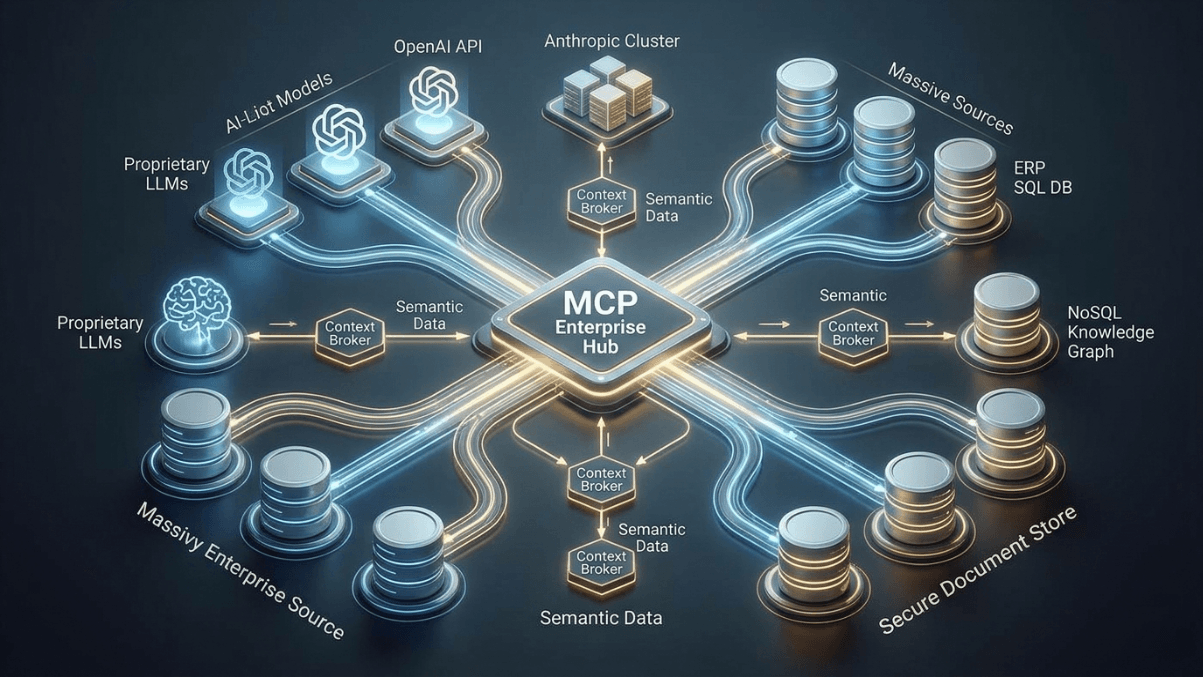
97 million monthly SDK downloads. Backing from Anthropic, OpenAI, Google, and Microsoft. Adoption across hundreds of Fortune 500 companies. The Model Context Protocol (MCP) has gone from an internal Anthropic experiment to the universal standard for connecting AI agents to enterprise tools in just over a year.
If your organization is building with large language models, MCP is no longer optional. It is the integration layer your AI strategy is missing.
In this guide, you will learn what MCP is, how its architecture works, how to build your first MCP server and client, how it compares to traditional APIs, what security risks to watch for, and how enterprises are deploying it at scale in 2026. Whether you are an engineering lead planning your AI infrastructure, a developer writing your first MCP server, or a CTO evaluating integration standards, this is everything you need to get started.
The Model Context Protocol (MCP) is an open standard developed by Anthropic that provides a universal, standardized method for connecting AI assistants and large language models to external data sources, tools, and systems. Think of MCP as the USB-C port for AI applications: just as USB-C replaced dozens of proprietary chargers with a single universal connector, MCP replaces ad-hoc AI integrations with one consistent protocol that works across models, tools, and platforms.
MCP focuses solely on the protocol for context exchange. It does not dictate how AI applications use LLMs or manage the provided context. Instead, it builds on top of function calling, the primary method for invoking APIs from LLMs, to make development simpler, more consistent, and more secure.
| Specification | Details |
|---|---|
| Developer | Anthropic (open-sourced November 2024) |
| Protocol Type | Open standard, JSON-RPC 2.0 based |
| Architecture | Client-server with host orchestration |
| Official SDKs | Python, TypeScript/JavaScript |
| Community SDKs | .NET, Java, Rust, Go, Ruby, Swift, Kotlin |
| Transport Options | Stdio (local), Streamable HTTP (remote) |
| Core Primitives | Tools, Resources, Prompts, Sampling |
| Monthly SDK Downloads | 97M+ (as of early 2026) |
| Enterprise Backers | Anthropic, OpenAI, Google, Microsoft, Amazon, Block |
| License | Open source (MIT) |
Before MCP, connecting an AI model to an external tool meant writing custom integration code for every single tool and every single model. A company using three LLMs across ten internal tools needed thirty separate integrations, each with its own authentication logic, error handling, and data formatting. Every time a tool updated its API or a new model was adopted, integrations broke.
This is the M x N problem. With M models and N tools, you need M times N custom integrations. MCP collapses this into M + N: each model implements one MCP client, each tool implements one MCP server, and everything connects through the standard protocol.
Add a new tool? Write one MCP server and every model can use it immediately. Add a new model? Implement one MCP client and it gets access to every existing server.
Gartner predicts that 40% of enterprise applications will embed task-specific AI agents by the end of 2026. Those agents need to read databases, call APIs, access file systems, query CRMs, and trigger workflows. MCP is what makes that possible without drowning your engineering team in custom integration debt.
MCP follows a client-server architecture with three distinct components that work together to connect AI applications to external capabilities.
1. MCP Host: The AI application that coordinates everything. Examples include Claude Desktop, Claude Code, VS Code with Copilot, or your own custom AI application. The host creates and manages one or more MCP clients and decides which capabilities to use.
2. MCP Client: A lightweight connector that maintains a dedicated one-to-one connection with a single MCP server. The host creates one client per server. The client handles protocol negotiation, capability discovery, and message routing between the host and server.
3. MCP Server: The external service that provides context, tools, or capabilities. Each server exposes a specific set of functionality through standardized primitives. Servers can connect to databases, file systems, APIs, SaaS platforms, or any other data source.
MCP servers expose functionality through four core primitives that give AI models structured access to external systems.
| Primitive | Purpose | Example | Controlled By |
|---|---|---|---|
| Tools | Actions the model can execute | Run a SQL query, send a Slack message, create a GitHub issue | Model (with user approval) |
| Resources | Data the model can read | File contents, database records, API responses | Application |
| Prompts | Reusable interaction templates | Code review template, analysis workflow | User |
| Sampling | Server requests LLM completions through the client | Server asks the model to summarize data before returning it | Server (with host approval) |
MCP is divided into two communication layers. The Data Layer defines the JSON-RPC based protocol for client-server communication, including lifecycle management and the core primitives like tools, resources, prompts, and notifications. The Transport Layer defines the actual communication mechanisms, including transport-specific connection establishment, message framing, and authorization.
MCP supports two primary transport mechanisms. Stdio transport uses standard input/output streams for direct process communication between local processes on the same machine, providing optimal performance with zero network overhead. Streamable HTTP transport enables remote server communication over HTTP, supporting multiple concurrent clients, stateless deployment across server instances, and scalable session handling.
MCP does not replace REST APIs. It adds a standardized layer on top, optimized specifically for AI-to-tool communication. Understanding where each approach fits is critical for making the right architectural decisions.
| Dimension | Traditional REST APIs | Model Context Protocol (MCP) |
|---|---|---|
| Designed For | General-purpose application integration | AI-to-tool communication specifically |
| Communication | Request-response (unidirectional) | Bidirectional messaging with callbacks |
| Discovery | Static documentation (OpenAPI/Swagger) | Runtime capability discovery |
| Context | Stateless per request | Maintains conversation context across exchanges |
| Schema | Developer reads docs, writes code | Model reads schema, invokes tools automatically |
| Integration Effort | Custom code per API per model | One server per tool, works with all models |
| Error Handling | HTTP status codes, custom error formats | Standardized JSON-RPC error responses |
| Security Model | API keys, OAuth, per-integration | Host-managed access controls, session isolation |
The key insight is that MCP and REST APIs are complementary. Many enterprises run both: REST APIs for traditional system-to-system integrations and MCP for AI-specific workflows. Your existing API infrastructure does not get thrown away. MCP servers often wrap existing APIs, exposing them in a format that AI models can discover and use dynamically.
Building your first MCP server is straightforward with the official Python SDK. The following example creates a server that exposes a simple database query tool.
pip install mcp[cli]
from mcp.server.fastmcp import FastMCP
import sqlite3
from contextlib import closing

# Initialize the MCP server
mcp = FastMCP("database-query-server")

# Define a tool that queries a SQLite database
@mcp.tool()
def query_database(sql: str, database_path: str = "app.db") -> str:
    """Execute a read-only SQL query against the database.

    Args:
        sql: The SQL SELECT query to execute.
        database_path: Path to the SQLite database file.

    Returns:
        Query results as formatted text.
    """
    if not sql.strip().upper().startswith("SELECT"):
        return "Error: Only SELECT queries are allowed for safety."

    try:
        with closing(sqlite3.connect(database_path)) as conn:
            conn.row_factory = sqlite3.Row
            cursor = conn.execute(sql)
            rows = cursor.fetchall()

            if not rows:
                return "Query returned no results."

            columns = rows[0].keys()
            header = " | ".join(columns)
            separator = " | ".join(["---"] * len(columns))
            data = "\n".join(
                " | ".join(str(row[col]) for col in columns)
                for row in rows
            )
            return f"{header}\n{separator}\n{data}"

    except sqlite3.Error as e:
        return f"Database error: {e}"

# Define a resource that provides database schema information
@mcp.resource("schema://tables")
def get_table_schema() -> str:
    """Returns the schema of all tables in the database."""
    with closing(sqlite3.connect("app.db")) as conn:
        cursor = conn.execute(
            "SELECT sql FROM sqlite_master WHERE type='table'"
        )
        schemas = [row[0] for row in cursor.fetchall() if row[0]]
        return "\n\n".join(schemas)

if __name__ == "__main__":
    mcp.run()
# Run the server using the MCP CLI inspector
mcp dev server.py

# Or run directly with stdio transport
python server.py
This server exposes two capabilities to any MCP client: a tool for executing read-only SQL queries and a resource for inspecting the database schema. The AI model can discover both at runtime, read the schema to understand the data structure, and then construct and execute appropriate queries.
The official TypeScript SDK works with Node.js, Bun, and Deno. Here is the same database server implemented in TypeScript.
mkdir mcp-db-server && cd mcp-db-server
npm init -y
npm install @modelcontextprotocol/sdk better-sqlite3
npm install -D typescript @types/better-sqlite3 @types/node
npx tsc --init
import { McpServer } from "@modelcontextprotocol/sdk/server/mcp.js";
import { StdioServerTransport } from "@modelcontextprotocol/sdk/server/stdio.js";
import Database from "better-sqlite3";
import { z } from "zod";

const server = new McpServer({
  name: "database-query-server",
  version: "1.0.0",
});

// Register a tool for database queries
server.tool(
  "query_database",
  "Execute a read-only SQL query against the SQLite database",
  {
    sql: z.string().describe("The SQL SELECT query to execute"),
    database_path: z
      .string()
      .default("app.db")
      .describe("Path to the SQLite database"),
  },
  async ({ sql, database_path }) => {
    if (!sql.trim().toUpperCase().startsWith("SELECT")) {
      return {
        content: [
          {
            type: "text",
            text: "Error: Only SELECT queries are allowed for safety.",
          },
        ],
      };
    }

    try {
      const db = new Database(database_path, { readonly: true });
      const rows = db.prepare(sql).all();
      db.close();

      if (rows.length === 0) {
        return {
          content: [{ type: "text", text: "Query returned no results." }],
        };
      }

      const columns = Object.keys(rows[0] as Record<string, unknown>);
      const header = columns.join(" | ");
      const separator = columns.map(() => "---").join(" | ");
      const data = rows
        .map((row) =>
          columns
            .map((col) => String((row as Record<string, unknown>)[col]))
            .join(" | ")
        )
        .join("\n");

      return {
        content: [{ type: "text", text: `${header}\n${separator}\n${data}` }],
      };
    } catch (error) {
      return {
        content: [
          { type: "text", text: `Database error: ${(error as Error).message}` },
        ],
      };
    }
  }
);

// Register a resource for schema inspection
server.resource("tables-schema", "schema://tables", async (uri) => ({
  contents: [
    {
      uri: uri.href,
      mimeType: "text/plain",
      text: "Database schema information available upon connection.",
    },
  ],
}));

// Start the server with stdio transport
const transport = new StdioServerTransport();
await server.connect(transport);
# Compile and run
npx tsc
node dist/server.js

# Or use npx with the MCP inspector
npx @modelcontextprotocol/inspector node dist/server.js
While many developers build MCP servers, understanding the client side is equally important if you are building a custom AI application that needs to consume MCP servers.
from mcp import ClientSession, StdioServerParameters
from mcp.client.stdio import stdio_client
import asyncio

async def connect_to_server():
    """Connect to an MCP server and list available tools."""
    server_params = StdioServerParameters(
        command="python",
        args=["server.py"],
    )

    async with stdio_client(server_params) as (read, write):
        async with ClientSession(read, write) as session:
            # Initialize the connection
            await session.initialize()

            # Discover available tools
            tools = await session.list_tools()
            print(f"Available tools: {[t.name for t in tools.tools]}")

            # Discover available resources
            resources = await session.list_resources()
            print(f"Available resources: {[r.name for r in resources.resources]}")

            # Call a tool
            result = await session.call_tool(
                "query_database",
                arguments={"sql": "SELECT * FROM users LIMIT 5"}
            )
            print(f"Result: {result.content[0].text}")

asyncio.run(connect_to_server())
This client connects to the database server, discovers its tools and resources at runtime, and executes a query. The key pattern here is dynamic discovery: the client does not need to know in advance what the server offers. It asks, learns, and adapts.
The MCP ecosystem has exploded with production-ready servers for common enterprise tools. Here are the most widely adopted implementations.
| MCP Server | Category | Key Capabilities |
|---|---|---|
| Filesystem | Data Access | Read/write files, manage directories, search files with configurable access controls |
| GitHub | Development | Manage repositories, issues, pull requests, branches, releases, and code reviews |
| Slack | Communication | Channel management, messaging, DMs, group DMs, smart history fetch |
| PostgreSQL / SQLite | Database | Schema inspection, query execution, business intelligence, query validation |
| Git | Version Control | Read, search, and manipulate Git repositories |
| Google Drive | Cloud Storage | File search, document reading, metadata access |
| Puppeteer / Playwright | Browser Automation | Web scraping, screenshot capture, form interaction, page navigation |
| Memory | Knowledge Management | Knowledge graph-based persistent memory for long-term context |
The official MCP servers repository on GitHub maintains reference implementations, while companies like Block, Stripe, and Cloudflare maintain production-grade servers for their platforms. The community has contributed hundreds more, covering everything from email and calendars to CI/CD pipelines and monitoring dashboards.
With great power comes serious security responsibility. MCP gives AI models direct access to databases, file systems, APIs, and external services. If not secured properly, a single prompt injection attack could cascade through your entire tool chain. Security researchers have identified alarming vulnerability rates across the ecosystem.
| Vulnerability | Prevalence | Impact |
|---|---|---|
| OAuth Authentication Flaws | 43% of MCP servers | Supply chain attacks impacting development environments |
| Command Injection | 43% of MCP servers | Remote code execution on host systems |
| Unrestricted Network Access | 33% of MCP servers | Malware download, data exfiltration, C2 communication |
| Tool Poisoning | 5% of open-source servers | Hidden backdoors that execute when the AI calls the tool |
Prompt injection is not new, but MCP makes it significantly more dangerous. Without MCP, a prompt injection attack produces bad output. With MCP tool access, the same attack triggers unsafe execution: unintended database writes, unauthorized API calls, data exfiltration, or file system modifications. An attacker who injects instructions into data that the model reads can steer the agent into calling tools it should never touch.
Deploying MCP at enterprise scale requires more than installing a few servers. Here is a practical roadmap based on patterns from early adopters.
MCP is already powering production workflows across industries. Here are concrete examples of how enterprises are using it.
Development teams use MCP servers for GitHub, Git, and their CI/CD pipelines so that AI coding assistants can read repository context, create pull requests, run tests, and review code without switching tools. Amazon used AI agents with MCP-style tool access to modernize thousands of legacy Java applications.
Support agents connect to CRM databases, knowledge bases, and ticketing systems through MCP. When a customer contacts support, the AI agent reads the customer’s history, checks recent orders, searches the knowledge base for solutions, and drafts a response, all through standardized MCP tool calls.
Block, co-founder of the Agentic AI Foundation alongside Anthropic, uses MCP servers for financial and commerce workflows. AI agents can query transaction databases, analyze spending patterns, generate compliance reports, and flag anomalies, all while operating within strict access controls.
Genentech built agent ecosystems on AWS to automate complex research workflows. MCP servers connect AI models to research databases, lab information systems, and regulatory document repositories, enabling researchers to query vast datasets using natural language.
Data teams use MCP to give AI agents controlled access to data warehouses, ETL pipelines, and monitoring dashboards. An agent can inspect table schemas, run analytical queries, identify data quality issues, and generate reports without a data engineer writing custom scripts for each request.
The MCP specification continues to evolve rapidly. The updated 2026 roadmap focuses on four critical areas for enterprise readiness.
| Priority | What It Addresses | Why It Matters |
|---|---|---|
| Transport Scalability | Evolve Streamable HTTP to run statelessly across multiple server instances | Enables horizontal scaling for high-traffic enterprise deployments |
| Agent Communication | Define how MCP servers interact with each other in multi-agent systems | Supports complex orchestration patterns where agents delegate to other agents |
| Governance Maturation | Enterprise-managed auth with SSO integration, audit trails, observability | Meets compliance requirements for regulated industries |
| Configuration Portability | Standardized server configuration that works across hosts and platforms | Reduces deployment friction when moving between development and production |
Full standardization is expected by late 2026, with alignment to emerging global compliance frameworks for AI governance. This is the year MCP transitions from experimentation to enterprise-wide deployment.
If you want to start using MCP today, here is the fastest path from zero to a working integration.
The entire process takes under an hour for a developer familiar with Python or TypeScript. The learning curve is deliberately shallow because MCP was designed to make AI integration simple, not to replace the complexity of custom integrations with a different kind of complexity.
At Metosys, we build custom AI and automation solutions that solve real business problems, from document intelligence pipelines to computer vision systems and data engineering platforms. MCP is a natural fit for the enterprise AI architectures we design. It provides the standardized integration layer that connects AI agents to the databases, APIs, and internal tools our clients rely on, without the fragile custom integration code that breaks every time something changes.
Whether you are building your first AI agent or orchestrating dozens across your organization, having the right integration protocol matters. MCP gives your AI infrastructure the same reliability and consistency that your traditional software infrastructure already depends on.
MCP is an open standard developed by Anthropic that provides a universal method for connecting AI models and agents to external tools, data sources, and systems. It standardizes how LLMs discover and use tools through a client-server architecture with JSON-RPC messaging.
Yes. MCP is open source under the MIT license. The protocol specification, official SDKs for Python and TypeScript, and reference server implementations are all freely available. There are no licensing fees or usage costs for the protocol itself.
No. MCP complements REST APIs by adding an AI-optimized layer on top. Many MCP servers wrap existing REST APIs, exposing them in a format that AI models can discover and use dynamically. Enterprises typically run both: REST APIs for traditional integrations and MCP for AI workflows.
MCP is backed by Anthropic (the creator), OpenAI, Google, Microsoft, Amazon, and Block. Hundreds of Fortune 500 companies have adopted MCP for their enterprise AI deployments, and the ecosystem includes thousands of community-contributed server implementations.
MCP includes security features like host-managed access controls, session isolation, and transport-level security. However, security depends on implementation. Research shows that 43% of community MCP servers have authentication or injection vulnerabilities, making rigorous vetting and least-privilege deployment essential.
Official SDKs are available for Python and TypeScript/JavaScript. Community SDKs exist for .NET, Java, Rust, Go, Ruby, Swift, and Kotlin. The protocol is language-agnostic since it uses JSON-RPC, so any language that can handle JSON over stdio or HTTP can implement MCP.
MCP supports transport-level security including TLS for HTTP connections. The 2026 roadmap prioritizes enterprise-managed authentication with SSO integration, so IT teams can control MCP access through existing identity providers rather than managing separate credentials.
Yes. MCP is model-agnostic. While Anthropic developed it, OpenAI, Google, and Microsoft have all adopted the standard. Any LLM that supports function calling can work with MCP servers through an MCP client implementation.
Stdio transport is for local, single-client connections where the server runs as a subprocess on the same machine. It offers zero network overhead and maximum performance. Streamable HTTP transport is for remote, multi-client deployments where the server runs on a separate machine or in the cloud, supporting horizontal scaling.
Start by wrapping your existing APIs in MCP servers. Each API endpoint becomes an MCP tool with typed parameters and descriptions. The MCP server acts as a bridge between the AI model and your API, handling discovery, schema generation, and response formatting automatically.
The primary risks are security vulnerabilities in MCP server implementations (prompt injection, command injection, tool poisoning) and the immaturity of governance features. Mitigate these by vetting all servers, enforcing least privilege, requiring human approval for destructive actions, and logging all tool invocations.
A basic MCP server with one or two tools can be built in under an hour using the official SDK. A production-grade server with comprehensive error handling, authentication, logging, and security hardening typically takes one to three days depending on the complexity of the underlying system being exposed.
Was this article helpful?


Stay in the know with insights from industry experts.
